Search Knowledge Base
The goal of REDDCRYPT is to make email encryption possible for everyone and at the same time to make it as secure as possible. For this reason, we use OpenPGP as the underlying encryption method, but automate the entire certificate creation and exchange of public keys.
Although the entire complexity of key management is removed from the user, it is possible to decrypt your own emails using standard OpenPGP tools if required.
We would like to explain how to do this as simply as possible below.
Important note in advance: This function is only available if you are a free user. As soon as you are a member of an organization, this function is no longer available. This is because in this case your account is interpreted as a company account and not as a private account and control of the account is therefore the responsibility of your company.
Prerequisites
To manually decrypt a REDDCRYPT email, you can use any tools with which OpenPGP files can be decrypted. This guide uses the GnuPG command line tools as an example: https://gnupg.org/ftp/gcrypt/binary/
In our example we are working with the application for Windows, install the latest version of: gnupg-w32-<version>.exe
Note: The following commands usually also work without adaptation under Linux or Mac OSX if the corresponding GnuPG tools are installed.
Import REDDCRYPT private key into the OpenPGP key ring
To decrypt a REDDCRYPT email, you always need your own private key. You can export this in the REDDCRYPT web app and then import it into your OpenPGP key ring.
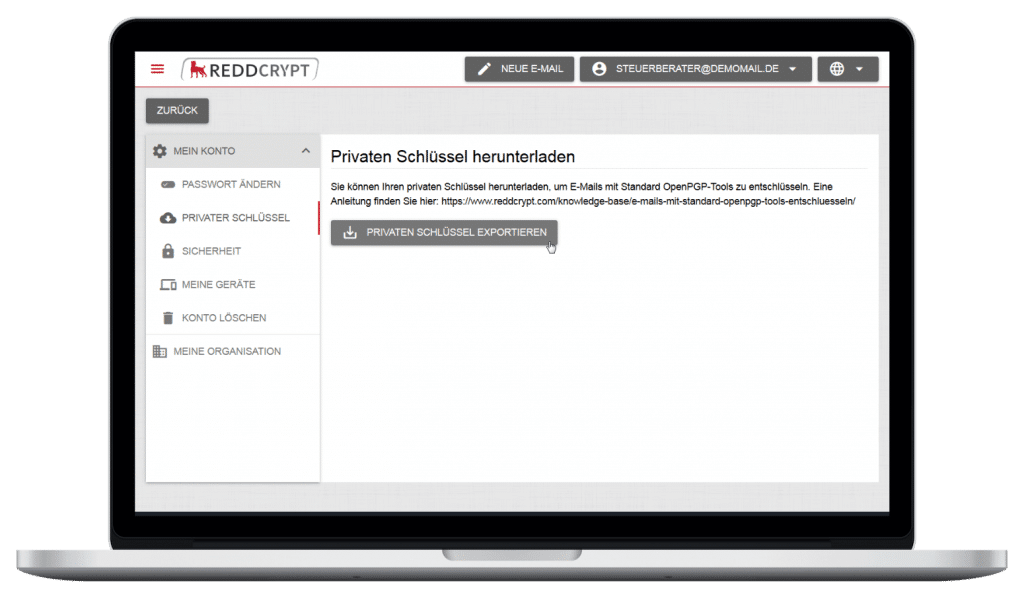
After you have saved your private key, you can import the key into your OpenPGP key ring with the following command:
gpg --import privatekey.ascDepending on the PGP tool, you may be asked for the password directly during the import or only when using the key.
Decrypting a REDDCRYPT email on the command line
To decrypt a REDDCRYPT email, simply save the encrypted attachment from the REDDCRYPT Transport Mail in any directory.
Now you can decrypt the file with the following command:
gpg --decrypt --output decrypted.eml reddcrypt.securemail- The –decrypt parameter is used to specify the operation for decrypting the file.
- You can use the –output parameter to specify the file name of the decrypted mail.
The OpenPGP tool will then ask you for the password for your private key. Here you must use the password of your REDDCRYPT account.

Once the password has been successfully entered, the mail is decrypted.

This is because the sender’s public key is required to verify the signature. However, this cannot be automatically retrieved by the PGP tools during decryption.
When decrypting emails with one of the REDDCRYPT applications, the public key is automatically retrieved and the signature verified.
Checking the signature of a REDDCRYPT email on the command line
To check the signature of the REDDCRYPT email, the sender’s public key can be retrieved manually for test purposes.
IMPORTANT: Querying the public keys via the standard protocol (HKP) is for test purposes only. In contrast to the standard PGP key servers, REDDCRYPT does not support unrestricted access to the public keys.
- It is not possible to query email addresses
- Access is limited to one query per minute
The key ID of the key is required to obtain the appropriate public key to verify the signature. This is displayed in the message after decrypting the email.

In this example, the ID of the key used for signing is 87FA9F20.
To retrieve the public key with this ID from the REDDCRYPT key server, the following command can be used:
gpg --keyserver hkps://keys.reddcrypt.com --recv-keys 87FA9F20The public key is then automatically imported into your OpenPGP key ring.

The email can now be decrypted again and the signature is also successfully checked.


