Search Knowledge Base
The web app for REDDCRYPT (available at https://app.reddcrypt.com) can be used directly in the browser and does not require any additional software to be installed.
Please note that Internet Explorer does not support all the necessary functions of the Web Crypto API. Encryption and decryption would take about 10 times as long compared to modern browsers (e.g. Chrome, Firefox, Edge), which is why we have decided not to support Internet Explorer.
Registration / Login
Start your browser and go to the REDDCRYPT website: https://app.reddcrypt.com. Here you can now choose whether you want to create a new REDDCRYPT account or log in to an existing account.
Create new account
Enter the email address for which you want to configure REDDCRYPT

A registration pin for verifying the address will be sent to the email address you entered. Enter this PIN in the setup window.

Define your personal password for the login.

Use existing account
Enter both the email address and the password configured for REDDCRYPT and click on “Go to app”.

Operation
The most important settings can be found in the top right-hand corner.

The mailbox management is located in the top left-hand corner.

Here you can switch the view of the mailbox between inbox and outbox, write an encrypted mail or open a REDDCRYPT file.

Write a new email
- Write a new encrypted email
- The recipient field checks whether the recipient already has a REDDCRYPT account
- If the recipient already has a REDDCRYPT account, the email address is highlighted in green:

If the recipient does not have a REDDCRYPT account, the email address is highlighted in red.
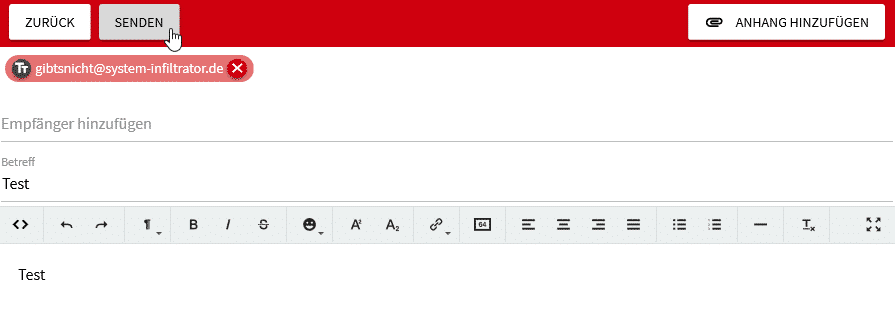
After clicking on Send, define a password for the encryption and communicate this to the recipient (e.g. via telephone). This is only necessary for the first e-mail to recipients who do not yet have a REDDCRYPT account.

Options for individual emails
The following functions are available in the inbox and outbox:
- Answers
- All answers
- Forward
- Save email as an encrypted REDDCRYPT file
- Save decrypted email (download as eml file)
- Delete email

Settings
In the settings you can log out, change your password, delete your account and download your private key(to the documentation).
Language
Here you can switch the language between German and English.

